MUSIC-DRIVEN VISUALS · COMING SOON

OSCILLIHUE

You build the track.
Oscillihue builds the visual world.

Upload your track, choose a visual world, and shape the way it moves. Oscillihue listens to the music, renders your direction in the cloud, and sends back a finished video.

Invite one artist who confirms their email and earn a Starter Render Pass: two previews and one 5-second Draft render.

From track to final.

Upload your track and choose a visual world from the launch library. Oscillihue analyzes the music, lets you shape how the scene responds, and renders a real preview you can review. When the final is ready, you download the finished video.

  1. 01Upload Track
  2. 02Choose a World
  3. 03Shape the Response
  4. 04Review a Preview
  5. 05Download the Video
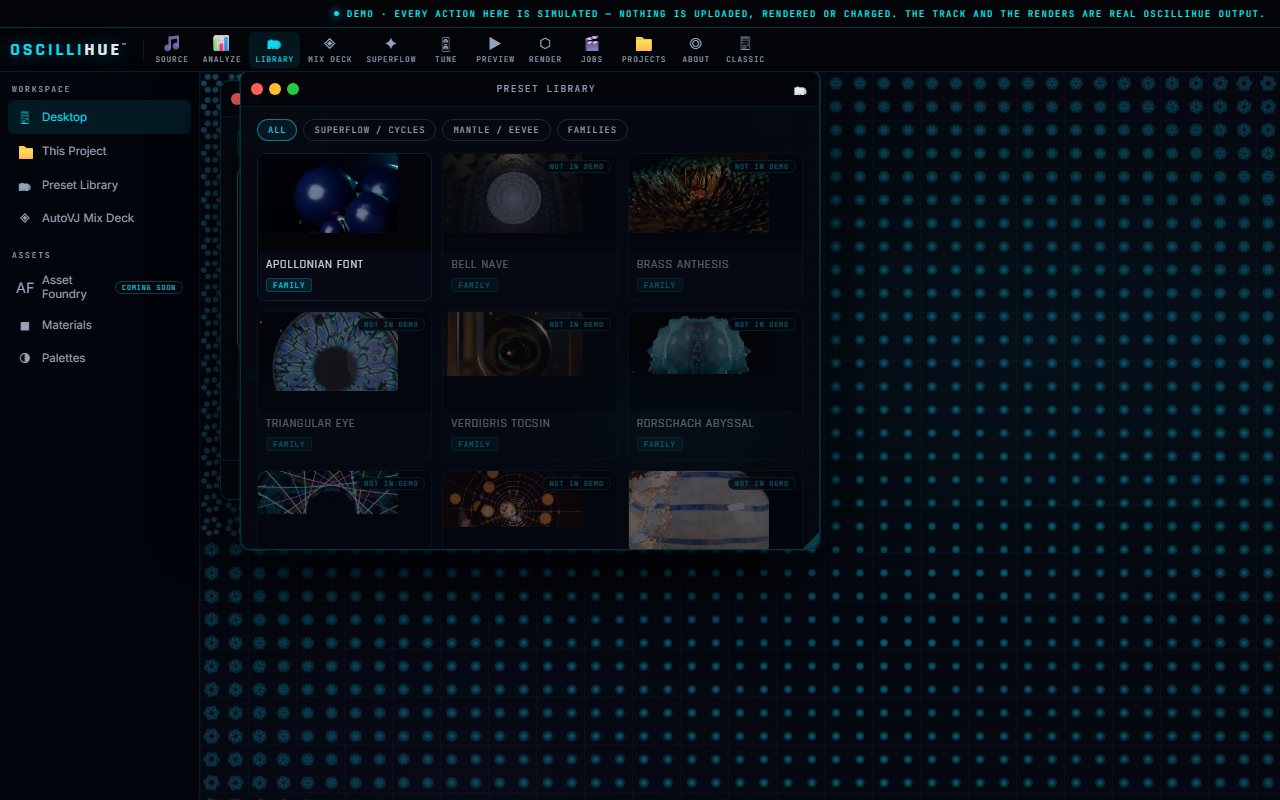
Oscillihue Presets library showing Superflow production builds and the complete 40-build visual catalog
CURRENT OSCILLIHUE BUILDSUPERFLOW / ALL 40 BUILDS
Curious about the technical side?

Oscillihue analyzes rhythm, frequency bands, and changes in musical energy. Those signals drive approved controls inside the visual build, including motion, materials, camera behavior, and effects.

AVRNDR runs the build on managed cloud GPUs and produces real preview frames and video. The launch version sends back a finished file. You will not need a local GPU, Blender, Notch, or a plugin.

One world, shaped
by the music.

Solar Iris is a complete procedural scene. Its light, form, camera, and intensity change with the track, so the visual keeps evolving without losing its identity.

The edit listens.

AutoVJ is being built to work from a library of finished clips, follow a track’s energy, and time cuts around beats and downbeats.

This TimeSlice study shows that editing direction in action. It is not a finished one-click AutoVJ workflow yet.

You direct
the result.

Start with a visual world that already works, then shape it around your music. See the real result before you commit to the final render.

  1. 01
    Choose a worldStart with a launch-reviewed visual build, each with its own look and movement.
  2. 02
    Follow the trackBeat timing, frequency ranges, and shifts in energy drive meaningful parts of the scene.
  3. 03
    Shape the responseAdjust color, materials, camera behavior, intensity, and the ending.
  4. 04
    Preview the real renderReview the actual scene before committing to the final version.
  5. 05
    Choose your deliveryDownload a checked 1080p or 4K video at 30 or 60 FPS.
  6. 06
    Pay for completed workCredits are reserved when rendering starts and charged after successful delivery.

Focused at launch.
More control later.

The first release focuses on one job: turning your track into a finished visual. Later releases can open more of the creative process.

INITIAL RELEASE · LAUNCH HARDENINGV1

PRESET BUILDS

Make a video from your track.

Choose and tune an approved visual world, review cloud-rendered previews, and download a 1080p or 4K video. Everything runs in the cloud. You will not need Blender, Notch, a plugin, or your own GPU.

MANAGED CLOUD RENDERING / NOW IN DEVELOPMENT
NEXT · CREATIVE TOOLSV2

PROMPT TO SCENE

Describe what you want to see.

A future prompt studio could help shape scenes and open more output choices, including vertical, square, and widescreen video.

PLANNED / AFTER THE INITIAL RELEASE
LATER · EXPLORINGV3

CREATOR MARKETPLACE

Build worlds other artists can use.

A future marketplace could let approved digital artists submit Blender scenes for cloud-sandbox review, publish preset packs, and earn from sales or licensing.

PLANNED / REVIEWED BUILDS ONLY

1.5% goes to
carbon removal.

Lightbrush contributes 1.5% of Oscillihue revenue processed through Stripe to carbon-removal projects. You do not pay anything extra.

A COMPANY CONTRIBUTION · NOT A CARBON-NEUTRALITY CLAIM FOR AN INDIVIDUAL RENDER
HOW STRIPE CLIMATE WORKS ↗

A VJ set,
not a screensaver.

Oscillihue grew out of real show work. Watch the full Russ Liquid × Since JulEYE × Lightbrush × TaoBot performance, then explore five render moments from the set.

01 / ACTUAL RENDER Performance Field

CHOOSE A CLIP · PRESS PLAY · SINCE JULEYE × RUSS LIQUID

Visual art.
Always in motion.

We are exploring an always-on stream of finished Oscillihue art for homes, studios, venues, hotels, galleries, and any screen that deserves something alive.

CURATED VISUALS · CONTINUOUS PLAYBACK · PERSONAL AND COMMERCIAL OPTIONS

CHANNELS IS A FUTURE CONCEPT, NOT PART OF THE INITIAL OSCILLIHUE RELEASE.
PLAY THE CURRENT DEMOSUPERFLOW / SOLAR IRIS

Create together.
Shape what’s next.

Your renders stay private unless you choose to publish them. Public work can enter the community feed, earn votes, and take part in the programs we are building around the artists who use Oscillihue.

MONTHLY / TOP 10

The community’s favorite renders move beyond the feed.

Our planned monthly Top 10 would add winning public renders to the Oscillihue VJ Library. Selected work could appear at Lightbrush shows, be made available to participating VJs, and become eligible for 4K compilation packs with creator royalties under published licensing terms.

  1. 01
    Public when you chooseKeep a render private or publish it to the community feed.
  2. 02
    Vote on the next worldsHelp choose future preset concepts and creative directions.
  3. 03
    A path for scene creatorsFuture submissions would be reviewed and cloud-sandboxed before approval.
  4. 04
    Clear creator termsLicensing, royalties, voting rules, and payouts will be published before those programs open.

Credit-pack and subscription pricing will be published closer to launch, with plain examples of what each option can render.

Ready for
your next track.

JOIN THE LAUNCH LIST · OSCILLIHUE BY LIGHTBRUSH

Join before launch.

Save your place and we’ll email you when Oscillihue is ready. You can also earn a Starter Render Pass by inviting an artist or sharing the launch.

EARN A STARTER RENDER PASS / CURRENT VALUE: 5 CREDITS

Invite one artist who confirms through your link, or share two verified public posts on different platforms. The pass covers two Standard previews at 2 credits each and one 5-second 960×540 Draft render at 1 credit. If pricing changes before launch, we’ll adjust the credits so it still covers those same three renders. One pass per account.

Check your inbox.

We sent a confirmation link to . Open it to save your place and activate your personal invitation link.

It may take a few minutes. If you don’t see “Oscillihue Founding Loop,” check spam, promotions, and filtered folders.

You’re on the launch list.

We’ll email you when access opens. To earn a Starter Render Pass now, share Oscillihue on two different social platforms or invite one artist who confirms their email.

STARTER PASS PROGRESS0 / 2 SOCIAL POSTS

Your email is confirmed. Complete two verified public posts on different social platforms, or invite one artist who confirms their email.

OPTION 01 / SHARE OSCILLIHUEPrepare your post.
X / 16:9 + AUDIOACTUAL OSCILLIHUE RENDER

Instagram does not accept prefilled video captions from websites. We’ll copy this caption so you can paste it after the share sheet opens.

DOWNLOAD CLIP

POST VERIFICATIONAdd the public links.

Paste each public post URL after publishing. Two verified posts on different platforms unlock the Starter Render Pass.

We can check a public X post automatically when its caption includes your proof code. Paste the full post URL.

OPTION 02 / INVITE AN ARTISTSend a personal invitation.

If one artist joins and confirms their email through your invitation link, you’ll unlock the pass without making two social posts. You can earn one Starter Render Pass per account.

ARTIST INVITATIONS0 confirmed invitations
STARTER PASS / CURRENT CREDIT VALUE0 credits

ONE STARTER RENDER PASS MAXIMUM / ACCOUNT. Current value: 5 credits—two Standard previews at 2 credits each and one 5-second 960×540 Draft render at 1 credit. Its credit value adjusts at launch if pricing changes. Additional invitations do not earn additional passes.

That link expired.

Enter your email again and we’ll send a fresh confirmation link.